Precious - AI Photo Studio
- 4.6
- Rating
- 500.00K
- Installs
- Free
- Price

 Analysis by App-foxy
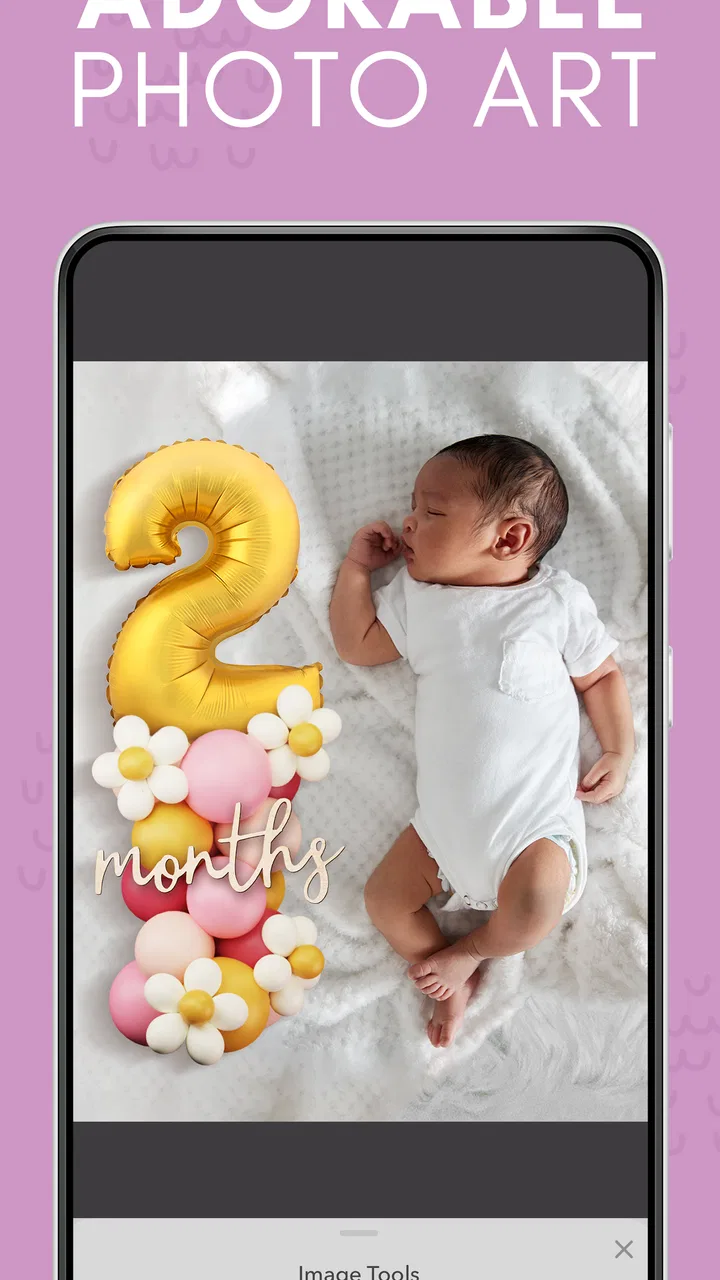
When a baby reaches a new milestone, I usually take far too many photos and still struggle to turn them into something I would actually want to keep. Precious - AI Photo Studio is aimed at that exact moment: taking ordinary baby pictures and helping shape them into keepsakes with a more magical, finished look. I approached it as a parenting app rather than a general photo editor, and that distinction matters. Its purpose is not to replace a full creative suite, but to make milestone memories feel more intentional without asking parents to learn complicated editing tools.
My first impression is that the app makes sense for families who photograph everything but rarely organize or present those images. The starting point is familiar: a phone full of snapshots, a special occasion approaching, and very little time to create something polished. The developer is Curious Creators Co., and the app is free to install, with optional in-app purchases ranging from $4.99 to $39.99 per item. That combination makes it easy to try, although anyone planning to use it regularly should pay attention to which parts of the creative process may involve a purchase.
From a quick baby snapshot to a keepsake
I find the move from a casual baby photo to a keepsake works best when I treat it as a small, intentional task rather than another item on a long to-do list. Choosing the moment first helps me decide how much decoration feels right and whether the result is for family sharing or personal safekeeping. Next, I look at how a focused creation flow can fit into a parent’s limited time.
You May Also Like

 Blood Strike: 2.5 Anniversary
Blood Strike’s Loadouts Turn Every Drop Into a Tactical Gamble
A close look at Blood Strike’s custom loadouts: how fast access to signature weapons reshapes its battle royale rhythm, rewards preparation, and narrows the gap between fights.

 Pandora - Music & Podcasts
Pandora’s Music Is Easy to Start, but Harder to Recover
Pandora’s strength is its low-effort path from a seed to a station. Its weak spot is how much confidence it asks you to place in connection, setup, and quiet recovery.

 8 Ball Pool
 Is Built on Rivalries, Rematches, and Routine
A close look at the rivalries, rematches, shared routines, and unanswered safety questions that turn a quick pool match into a persistent mobile community.

 Samsung Music
’s Quiet Strength Is Playing What You Already Own
Its reach comes less from spectacle than from dependable access to a personal library. That simplicity is both the app’s strongest retention engine and its ceiling.

 AccuWeather: Weather Radar
AccuWeather Review: A Quick, Clear Forecast for Everyday Decisions
For everyday plans, the best forecast is the one you can understand quickly. AccuWeather makes rain timing, radar, and local conditions easy to act on, with a few trade-offs.

 Hill Climb Racing
Why Hill Climb Racing Still Turns Crashes Into One More Run
A tiny car, a bumpy hill and one more upgrade: Hill Climb Racing keeps resurfacing because its simple chaos makes every near-miss feel personal.
More From Our News Desk



Starting with the right photo
The quality of the final keepsake begins before any editing happens. I would choose a picture with the baby clearly visible, reasonable lighting, and enough space around the subject for a decorative composition. A tightly cropped image may look adorable in a camera roll but can become awkward when the app needs room for a milestone theme or visual treatment. This is one of the most useful habits I found: select the photo based on how it might be presented, not only on how cute it looks at first glance.
That workflow is especially practical after a busy day. Imagine a parent taking a picture after the baby sits independently for the first time. Instead of sorting through dozens of almost-identical shots later, the parent can choose one strong image, prepare it while the memory is still fresh, and turn it into something easier to share or save. The value is less about producing a technically perfect portrait and more about reducing the distance between “I should make something with this” and an actual finished keepsake.
I also recommend deciding what the image is for before starting. A private memory, a family message, and a printed-style milestone card may need different levels of decoration. If the goal is to preserve the baby’s expression, a restrained result will be more successful than a crowded one. If the goal is to mark a first birthday or another memorable stage, a more playful treatment may fit better. Thinking about the recipient first helps prevent the common mistake of editing simply because an effect is available.
Working through the creation flow
The app’s appeal is its focused direction. Rather than opening with the overwhelming range of controls found in a professional photo editor, it centers the experience on baby memories and celebratory presentation. That makes it friendlier for someone who wants a result quickly. I would not choose it when I need detailed color correction, layered retouching, or precise graphic design. I would choose it when the emotional purpose of the image is already clear and I need help giving it a keepsake-like finish.
A sensible workflow is to begin with one image, review the first result carefully, and only then decide whether to create a series. Starting with a batch can make it harder to notice whether the treatment suits the child’s lighting, clothing, or expression. Testing one photo first also protects time and helps reveal whether the visual style matches your taste. The best result comes from treating the app as a guided keepsake maker, not as an unlimited replacement for every photo tool.
When I review an AI-assisted editor, I look closely at whether the original moment still feels like itself. A polished background or magical presentation can be attractive, but a baby’s face, hands, and expression are the reason the photo matters. I would compare the finished image with the original before saving or sharing it, checking that the child remains recognizable and that the decoration supports rather than dominates the memory. This simple comparison is more important here than chasing the most dramatic visual effect.
The handoff from phone gallery to family memory
There is a quiet but important handoff in this kind of app: the image moves from an unstructured camera roll into a form that can be shown to someone else. That may mean sending it to a grandparent, keeping it with other milestone memories, or using it as a small visual record of the child’s growth. The app is most useful when it helps that handoff feel complete. A photo that is merely edited remains easy to lose; a photo made with a specific milestone in mind is easier to remember and revisit.
I would create a simple naming habit outside the editing moment, such as recording the milestone and month in the surrounding photo organization system. The app can help make the image special, but it should not be expected to replace a broader family archive. This is a non-obvious trade-off: a beautiful single image can create the feeling that the memory is organized when the original photos are still scattered across a phone. For long-term use, I would keep the original and the finished version together.
Sharing also changes how much editing is appropriate. A family group may appreciate a playful keepsake, while a private archive may benefit from a cleaner treatment that will still feel natural years later. I found it helpful to make one version for the immediate occasion and avoid assuming that the most decorative version will be the best historical record. The app encourages celebration, but parents still need to decide whether they are making a greeting, a social post, or an enduring family memento.
What the finished result does well
The strongest outcome is emotional rather than technical. A normal snapshot can become a small event: a picture connected to a first step, a new expression, or a family celebration. That is why the app fits the parenting category so naturally. It gives parents a way to acknowledge moments that might otherwise remain buried among everyday images.
The store rating is a 4.4 average from around 12 thousand ratings, and the app has passed 100 thousand installs. Those figures suggest that the idea has found an audience, but they do not remove the need for personal testing. Visual taste is subjective, and a style that feels magical to one family may seem too artificial to another. I would use the early result as a trial of the app’s aesthetic, not as a promise that every photo will look equally good.
Another strength is accessibility. The app is rated for Everyone, and it supports devices running Android 8.0 or later. That gives it a broad practical reach for families using older phones, although the experience will still depend on the phone’s camera quality, available storage, and general performance. Parents often work in short bursts between other tasks, so a workflow that feels understandable at a glance is more valuable than a long list of advanced controls.
The current version is 1.0.16, which is worth noting for anyone comparing experiences over time. Apps built around creative processing can change in appearance as they develop, so I would treat the current interface and results as a snapshot of the product rather than assume every future release will behave identically. For now, the important point is that it presents itself as a focused, early-stage tool for creating celebratory baby imagery rather than a mature all-purpose editing workstation.
Where the workflow breaks down
The first possible break is photo selection. If the source image is dark, blurry, crowded, or heavily cropped, a decorative treatment cannot fully repair it. Parents may expect the app’s AI angle to rescue any picture, but the most reliable approach is still to start with a clear original. This is not a criticism unique to artificial intelligence; it is a reminder that the emotional quality of the moment and the technical quality of the source are separate things.
The second break is expectation. Someone looking for manual control over every detail may feel constrained by a focused parenting editor. Usual alternatives such as a standard phone editor are better for quick brightness and cropping adjustments, while a full creative application is stronger for custom layouts and precise design. Precious is the better choice when speed, theme, and emotional presentation matter more than complete control. It is the weaker choice when the parent already knows exactly how the final image should be built.
Cost can become another point of friction. The app is free, which lowers the barrier to trying the workflow, but optional purchases can change the value calculation for families who want repeated or more elaborate creations. I would begin with a single meaningful milestone rather than planning an entire album immediately. That approach lets you judge whether the results are good enough to justify spending, instead of paying first and discovering that the style is not right for your family.
There is also a practical handoff problem when the finished image becomes part of a larger family routine. If several relatives are sending photos, or if parents are trying to document every week, a keepsake app can add another step to an already busy process. I would reserve it for moments that deserve emphasis rather than process every ordinary picture. Used selectively, it adds meaning. Used for everything, it may turn a joyful activity into another maintenance task.
Who should use it, and who should skip it
I would recommend this app to new parents who want more than a raw camera-roll image but less than a demanding design project. It is also a good fit for relatives preparing a small surprise for a family member, provided they already have a suitable baby photo and understand that the result is meant to be celebratory. Parents who enjoy documenting milestones but rarely have time to edit will probably get the clearest benefit.
I would be more cautious if you need a dependable archive, exact typography, detailed retouching, or a consistent visual identity across a large printed collection. In those cases, a conventional photo workflow may be better because it gives you more predictable control and organization. I would also skip it if you dislike AI-styled imagery in principle. The app’s central appeal is the transformation of a personal photo into something more magical; if that transformation feels less authentic to you, the convenience will not compensate for the mismatch.
Privacy-minded parents should make their own comfort decision before placing a child’s photo into any image-processing service. I would avoid uploading a picture that includes information I would not want to share beyond the immediate family, and I would keep an untouched copy of every important original. That is good practice for any cloud-connected creative workflow, not a reason to assume this particular app handles images in one specific way.
My practical routine for getting better keepsakes
My preferred routine would be deliberately small. I would choose the clearest photo, decide whether the result is for sharing or saving, create one version, and compare it with the original before doing anything else. If the child’s face remains the focus and the decoration supports the milestone, I would keep it. If the visual treatment competes with the expression, I would return to a simpler source image rather than endlessly adjusting the wrong photograph.
I would also avoid making the finished image the only copy. Keeping the original preserves flexibility for future tools, different family preferences, or a later album. This is particularly useful when a baby’s expression is precious but the first design feels dated. The keepsake can represent how the family celebrated at the time, while the original remains the more durable record of the child.
For recurring milestones, consistency matters more than novelty. Using a similar approach for a small set of important moments can make them feel connected, even if the individual photos were taken in different places. On the other hand, I would not force a template or style onto every image. A candid picture may work best with minimal treatment, while a birthday portrait can support something more imaginative. The app is most effective when it serves the photo rather than making every memory look identical.
My final view after following the full journey
Precious - AI Photo Studio succeeds because it starts with a real parenting problem: meaningful baby photos are plentiful, but finished keepsakes are not. Its focused approach makes the path from snapshot to celebration easier than opening a complex editor, and its free entry point makes experimentation reasonable. I especially like it for occasional milestones where the family wants a visual reminder that feels more considered than a standard phone image.
It is not the right tool for parents seeking complete design control, serious photo correction, or a replacement for organized family archiving. The workflow can also lose its charm if every image becomes another project or if optional purchases make frequent use uncomfortable. In my experience, the best balance is selective use: choose the moments that genuinely deserve a little ceremony, preserve the original, and judge each result by whether it keeps the baby—not the effect—at the center.
For that audience, this parenting app is easy to understand and emotionally well targeted. Curious Creators Co. has built something that fits the gap between an untouched snapshot and a fully designed memory product. I would install it for a special milestone, test the result with one strong photo, and continue only if the finished image feels like something my family would actually want to revisit. That is the standard that matters most here: not how elaborate the transformation looks, but whether it helps an ordinary moment stay memorable.
FAQs for Precious - AI Photo Studio
01What is Precious - AI Photo Studio?
Precious - AI Photo Studio is an advanced photo editing app that utilizes artificial intelligence to enhance and transform your images. With features like automatic retouching, background removal, and artistic filters, it aims to provide professional-grade edits with ease. It's available for both Android and iOS devices.
02How does the AI technology work in Precious - AI Photo Studio?
The AI technology in Precious - AI Photo Studio analyzes your photos to identify elements like faces, backgrounds, and objects. It then applies intelligent adjustments to enhance features, correct lighting, and suggest creative edits. This technology allows users to achieve quality results with minimal manual effort.
03Is Precious - AI Photo Studio suitable for beginners?
Yes, Precious - AI Photo Studio is designed to be user-friendly, making it suitable for beginners. The app offers intuitive controls and guided features that help users edit photos without requiring advanced skills. Additionally, the AI-guided suggestions assist in making professional edits accessible to everyone.
04What are the main features of Precious - AI Photo Studio?
Precious - AI Photo Studio offers a variety of features including auto-enhancement, background removal, artistic filters, and retouching tools. It also provides advanced options like color correction and custom filters, allowing users to experiment with different styles and effects to achieve their desired look.
05Are there any in-app purchases or subscriptions required?
While Precious - AI Photo Studio offers a range of free features, some advanced tools and filters may require in-app purchases or a subscription. The app offers different pricing tiers, providing options for both occasional users and professional photographers who require more robust editing capabilities.
Pros
- Intuitive user interface for easy navigation.
- High-quality photo enhancement results.
- Variety of filters and effects available.
- Fast processing times for edits.
- Seamless integration with social media.
Cons
- Requires in-app purchases for advanced features.
- Occasional glitches with large photo files.
- Limited free version capabilities.
- Some filters can be overly dramatic.
- Needs constant internet connection for updates.

Precious - AI Photo Studio
Gallery